
Selling on Amazon sounds simple — create an account, list a product, and wait for sales. But once you log into Seller Central, it quickly becomes overwhelming. Inventory alerts, PPC dashboards, performance metrics, policy warnings — where do you even start?
That’s where Amazon seller account management becomes critical. It’s not just about opening an account. It’s about optimizing listings, managing ads, maintaining account health, and implementing a long-term growth strategy.
What is Amazon Seller Account Management?

Amazon seller account management is the work of running, improving and scaling your Amazon business within Seller Central.
It includes:
- Account creation and verification
- Product listing optimization
- Inventory and order management
- Advertising strategy(Amazon PPC management)
- Performance monitoring
- Amazon account health support and management
- Prevention of exploitation and suspension and compliance
Account Setup vs Account Management While many beginners mix up these terms. Registering your account is only the beginning. True success is gained from a disciplined management, which enhances its visibility, conversion rates and profitability.
If you are new, the official Amazon documentation hosted on the Amazon Seller Central Help portal is also helpful to reinforce your understanding of platform rules and compliance.
Step-by-Step Guide to Managing Your Amazon Seller Account
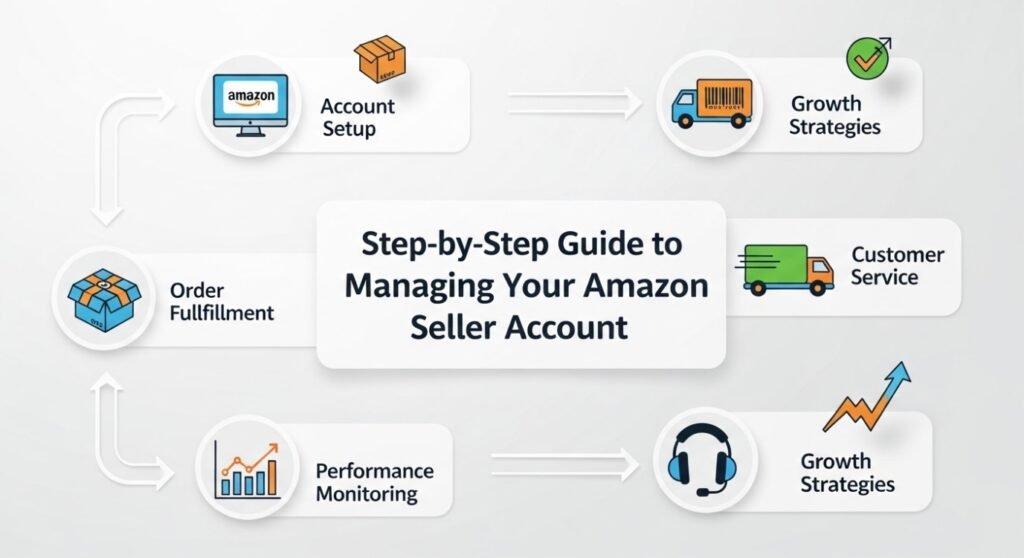
1. Create and Properly Set Up Your Seller Account
Start by choosing the right selling plan:
- Individual Plan – Best for beginners selling fewer than 40 items per month
- Professional Plan – Recommended for serious sellers who want advanced tools
Complete KYC verification, link your bank account, and explore the Seller Central dashboard. Understanding reports, business analytics, and inventory tabs early will save you countless headaches later.
This foundational knowledge is your first real step in mastering Amazon seller account management.
2. Product Listing Optimization (The Sales Engine)
Your product listing is your storefront. Without proper optimization, even great products won’t sell.
Here’s what matters most:
- Keyword research
- SEO-friendly product title
- Compelling bullet points
- Conversion-focused descriptions
- High-quality images
- Backend search terms
This is where Amazon listing optimization plays a major role. Beginners often upload a product without researching keywords — a costly mistake. Data-backed keyword targeting improves discoverability and organic ranking.
A well-optimized listing increases both traffic and conversion rate — two pillars of long-term growth.
3. Inventory & Order Management
Running out of stock kills rankings. Overstocking hurts cash flow. Smart inventory control is essential.
Best practices:
- Monitor stock levels weekly
- Use FBA (Fulfilled by Amazon) strategically
- Track returns and customer feedback
- Maintain fast shipping and response times
If you’re wondering how to manage Amazon seller account operations smoothly, this is where consistency matters most.
4. Amazon PPC & Advertising Strategy
Traffic doesn’t just happen — you must drive it.
Amazon PPC management includes:
- Sponsored Products campaigns
- Automatic vs Manual targeting
- Keyword bid optimization
- ACoS (Advertising Cost of Sales) tracking
- Budget allocation
Many beginners run ads without optimizing their listings first. That’s like pouring water into a leaking bucket.
Effective advertising requires:
- Strong keyword research
- Continuous testing
- Data-driven bid adjustments
When done correctly, PPC boosts ranking, increases sales velocity, and accelerates brand visibility.
5. Account Health & Performance Monitoring
Amazon is strict about performance metrics. Poor performance can lead to account suspension.
Monitor:
- Order Defect Rate (ODR)
- Late Shipment Rate
- Cancellation Rate
- Customer feedback
- Policy compliance
Amazon account health management is not optional — it’s survival. Regular monitoring builds trust with Amazon’s algorithm and protects your long-term business.
Common Beginner Mistakes
I mean, let’s face it: almost all new sellers fail because they:
- Ignore keyword research
- Underprice or overprice products
- Skip advertising strategy
- Fail to track profits
- Neglect analytics reports
Successful Amazon sellers treat it like a real business — not something you can do in your spare time on the side.
How to Scale Your Amazon Business

Once you have a good base everything else becomes scalable.
Intelligent Amazon Seller Growth Strategy Here’s what a smart Amazon seller growth strategy looks like:
- Expanding product variations
- Launching complementary products
- Advanced PPC scaling
- Conversion rate optimization
- Brand Registry enrollment
At scale, you need to reinvest, analyze and continually optimize. Growth isn’t random — it’s intentional.
DIY vs Professional Amazon Seller Account Management
Here’s a simple comparison:
| DIY Management | Professional Services |
| Steep learning curve | Expert-led strategy |
| Trial & error growth | Data-backed decisions |
| Time-consuming | Fully managed operations |
| Risk of suspension | Compliance monitoring |
| Limited scaling knowledge | Structured expansion plans |
While DIY works for some, many sellers prefer Amazon seller account management services to avoid costly mistakes and accelerate growth.
Frequently Asked Questions: Amazon Seller Account Management
1.What is Amazon seller account management program?
It’s strategy inside Seller Central.
2.How do beginners use Amazon Seller Central efficiently?
Begin with account creation, move to listing enhancement, inventory management and developing an advertising tactic.
3.Is Amazon PPC a must for beginners?
Yes. PPC gets early sales history and improves ranking exposure.
4.How long does it take to close a deal?
With well curated listings and advertising, novices could start to see results after 2–6 weeks.
5.Is selling on Amazon worth it just to deal with the management?
Absolutely. Management based on system contributes to loss prevention, improvement of efficiency and sustainable growth.
6.Can you be suspended if your account health is poor?
Yes. Not paying attention to those performance metrics, will get you a warning or deactivated.
Final Thoughts: Build Smart, Scale Confidently
Success on Amazon isn’t luck — it’s structure. Proper Amazon seller account management ensures:
- Optimized listings
- Profitable advertising
- Strong account health
- Scalable growth
If you’re serious about growing your Amazon business without wasting time or money, expert support can make all the difference.
🚀 Ready to Grow Faster?
Partner with Salesstrive and get a professional Amazon account audit today. Our experts help you optimize, scale, and protect your seller account with proven, data-driven strategies.
👉 Book your free consultation with SalesStrive now and turn your Amazon store into a revenue machine.